

Summer holidays sound great in theory, no school, no homework, more free time. But for most parents, it quickly turns into a familiar struggle: more free time often means more screen time.
Whether it’s YouTube or similar apps, games, or endless scrolling, screens become the easiest way to keep kids occupied. And suddenly, you’re left wondering,is this okay, or is this too much?
This is where the idea of screen time vs smart time becomes important. The goal isn’t to eliminate screens completely because that’s unrealistic in today’s day. Instead, it’s about making screen time more meaningful.
If screens are here to stay, the real question is: Can they actually help your child learn something?
What Is Screen Time and Why Parents Worry
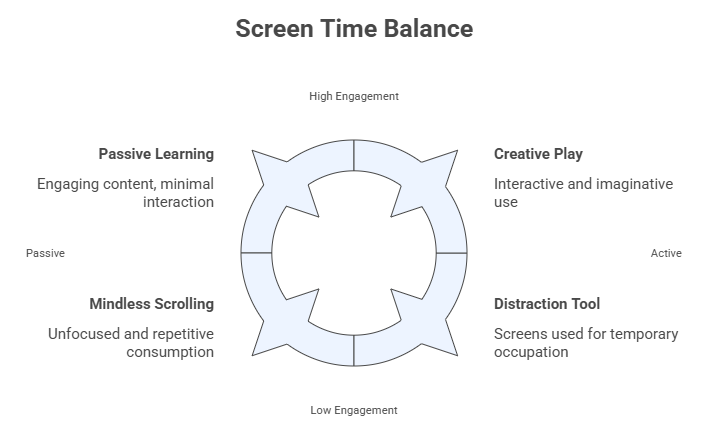
When most parents worry about screen time, they’re usually thinking about passive use. That means time spent in front of a screen without much learning, creativity, or interaction.
This often includes:
- Watching random videos for long stretches
- Playing repetitive, low-engagement games
- Scrolling endlessly with no clear purpose
The concern is not only how much time children spend on screens, but how that time is spent. Research suggests that excessive passive screen use may be linked with challenges such as:
- Reduced attention control and focus
- Disrupted sleep routines and shorter sleep duration
- Less time for imaginative play, exploration, and independent thinking
During busy moments, screens can keep children occupied and thus, many families quietly depend on the ‘digital babysitter’. It’s understandable and often practical. But when it becomes the default solution, children may miss out on real-world engagement and interactions.
That’s why conversations around digital wellbeing for kids matter more than ever. The goal is not to ban them entirely but move from passive consumption toward healthier, more intentional use that supports learning, creativity, and recreation.
What Is Digital Smart Time?
Smart time is simply a better way of using screens. Instead of passive consumption, it focuses on purpose-driven digital activity,where children are learning, thinking, or creating while using a device.
This could include:
- Interactive learning apps
- online study apps for students
- Problem-solving games
- Reading platforms
- Creative tools like drawing or storytelling apps
Some parents also use structured platforms or LMS-based tools that align with what children are learning in school. These LMS-based tools like NAVNEET TOPTECH’s TopSchool can provide added direction, especially during longer breaks when routines are lighter and learning gaps can widen. According to the Directorate for Education and Skills, well-designed digital learning platforms can help reinforce concepts, track progress, and maintain consistency outside the classroom.
The goal is not to make every moment academic but ensuring that at least some screen time is adding a meaningful balance.
Screen Time vs Smart Time: The Key Differences
Not all screen use is equal. The same amount of time can either entertain a child briefly or help them learn, create, and grow. The real difference lies in how that time is used.
| Aspect | Screen Time | Smart Time |
| Purpose | Entertainment | Learning + engagement |
| Activity Type | Passive (watching, scrolling) | Interactive (thinking, solving, creating) |
| Impact | Short-term distraction | Long-term skill building |
| Control | Random, unstructured | Planned and intentional |
| Outcome | Time spent | Skills gained |
Even small shifts toward purposeful use can make digital time more meaningful.
How to Convert Screen Time into Smart Time (Action Plan for Parents)
You don’t need a complete overhaul. Small, practical changes can go a long way.
Step 1: Set Clear Intent Before the Screen Turns On
Before handing over a device, decide why your child is using it. Is it for learning? Relaxation? Creativity?
Even a simple sentence like, “Let’s spend 20 minutes on something useful first,” helps build awareness. This is one of the easiest ways to build healthy screen time habits for kids.
Step 2: Choose Interactive Over Passive Content
Not all screen time is equal.
Swap:
- Endless videos → learning apps or puzzles
- Repetitive games → strategy or problem-solving games
Look for content where your child is thinking, responding, or creating, not just watching.
Step 3: Blend Offline + Online Learning
Smart time doesn’t mean staying on screens all day.
For example:
- Watch a short science video → try a simple experiment
- Use a reading app → discuss the story afterward
This mix keeps learning active and prevents screen fatigue.
Step 4: Use Structured Learning Platforms
During summer, structure tends to disappear.
Using a structured platform,like an LMS or guided learning app,can help maintain consistency. These tools often combine lessons, quizzes, and progress tracking, making it easier for parents to stay involved.
This is one practical way to answer the question: how to make screen time educational without constantly supervising.
Step 5: Create a Summer Smart-Time Routine
Children respond well to routine,even during holidays.
Instead of random screen usage, try setting:
- Fixed learning time
- Fixed entertainment time
This reduces arguments and creates a balanced daily rhythm.
A Sample Smart Summer Screen Schedule
Here’s a simple, realistic example you can adapt:
- 30 minutes – Reading app or storytelling
- 20 minutes – Game-based learning (math, logic, coding)
- 30–60 minutes – Outdoor play
- 1 hour – Free entertainment (videos, games)
This way, screens aren’t removed,they’re just better managed.
The Bigger Picture: Digital Skills Are the Future
It’s easy to think of screens as a distraction, but they’re also a part of your child’s future.
Today’s world requires:
- Digital literacy
- Problem-solving skills
- Comfort with technology
Completely restricting screens may not prepare children for this reality. On the other hand, guided digital exposure helps them build confidence and useful skills. The goal is balance,not restriction, not overuse.
A Smarter Way to Approach Screens This Summer
The debate around screen time vs smart time isn’t about good versus bad. It’s about how screens are used. By making small, intentional changes, parents can turn everyday screen use into something more meaningful. Whether it’s through interactive apps, structured platforms, or simple routines, the shift doesn’t have to be complicated. During summer vacation, a few smart choices can keep learning gently in motion while still leaving plenty of room for fun, rest, and carefree days.
FAQs
Q1. What is the difference between screen time and smart time?
Screen time usually refers to passive activities like watching videos, scrolling, or playing repetitive games without much interaction. Smart time focuses on purposeful digital use where children are learning, thinking, creating, or solving problems. The difference is not just how long children spend on screens, but how they use that time.
Q2. How much screen time is okay for children during summer holidays?
There is no single rule that works for every family. A healthy balance depends on your child’s age, daily routine, and the kind of content they engage with. Many parents find it helpful to balance educational activities, outdoor play and free entertainment so screens remain a part of the day without becoming the entire day.
Q3. How can parents make screen time more educational?
Parents can make screen time more meaningful by choosing interactive learning apps, reading platforms, problem-solving games, or guided digital learning tools. Setting a clear purpose before screen time begins and combining online activities with offline learning can also help children stay engaged in a more productive way.
Q4. Can digital learning platforms help children during summer break?
Yes. Structured learning platforms can help children maintain routines, revise concepts and stay connected with learning during longer school breaks. Many parents use guided platforms or age-appropriate educational apps to create consistency without making summer feel too structured.
Q5. Why is balancing screen time important for kids?
A balanced approach helps children enjoy technology while also making time for creativity, movement, rest, and real-world interaction. When screen use is planned and intentional, it can support learning and digital confidence while reducing the impact of excessive passive viewing.
Q6. What is a simple smart-time routine parents can follow during holidays?
A practical routine could include reading or learning activities first, followed by outdoor play, creative activities, and a set amount of entertainment time. Even small routines like fixed learning time and fixed screen breaks can make summer days feel more balanced and manageable for both children and parents.